Use APIs to integrate SEPA
Last updated: Apr 24th, 9:15pm
The Single Euro Payments Area (SEPA) is a payment-integration initiative of the European Union for simplifying bank transfers denominated in euros between member countries. SEPA helps customers make cashless euro payments to any account located anywhere in the area using a single bank account. To debit from SEPA bank accounts, account holders must accept a mandate authorizing the debtor to debit the account.
SEPA Direct Debit is a PayPal Direct Banking solution that supports you to offer SEPA banks as a payment option to your customers.
Key features of SEPA Direct Debit
- Supported transaction types: One-off or recurring payments
- Settlement: Instant
- Vaulting: Supported
- Transaction Currency:
EURonly - Supported Countries: Supports bank accounts from 16 countries: Austria, Belgium, Cyprus, Estonia, France, Germany, Greece, Italy, Latvia, Luxembourg, Malta, Netherlands, Portugal, Slovakia, Slovenia, Spain
- Refunds: Full, partial, and multiple partial refunds supported
- Integration Type: PayPal Orders v2 API
SEPA Direct Debit allows you to access funds immediately if you opt for instant settlements. The delayed settlement option will make funds available within the standard SEPA settlement timeframe of 2-3 days.
How it works
In your checkout flow, you can offer SEPA Direct Debit as a payment choice. Customers choosing to pay with SEPA Direct Debit will provide an IBAN. PayPal validates the IBAN and provides a link to a mandate page. The customer authorizes you and PayPal to debit their SEPA account by agreeing to the mandate. PayPal stores and manages mandates on your behalf. Funds can be debited after the customer accepts the mandate. Mandates can be specified as one-time or recurrent.
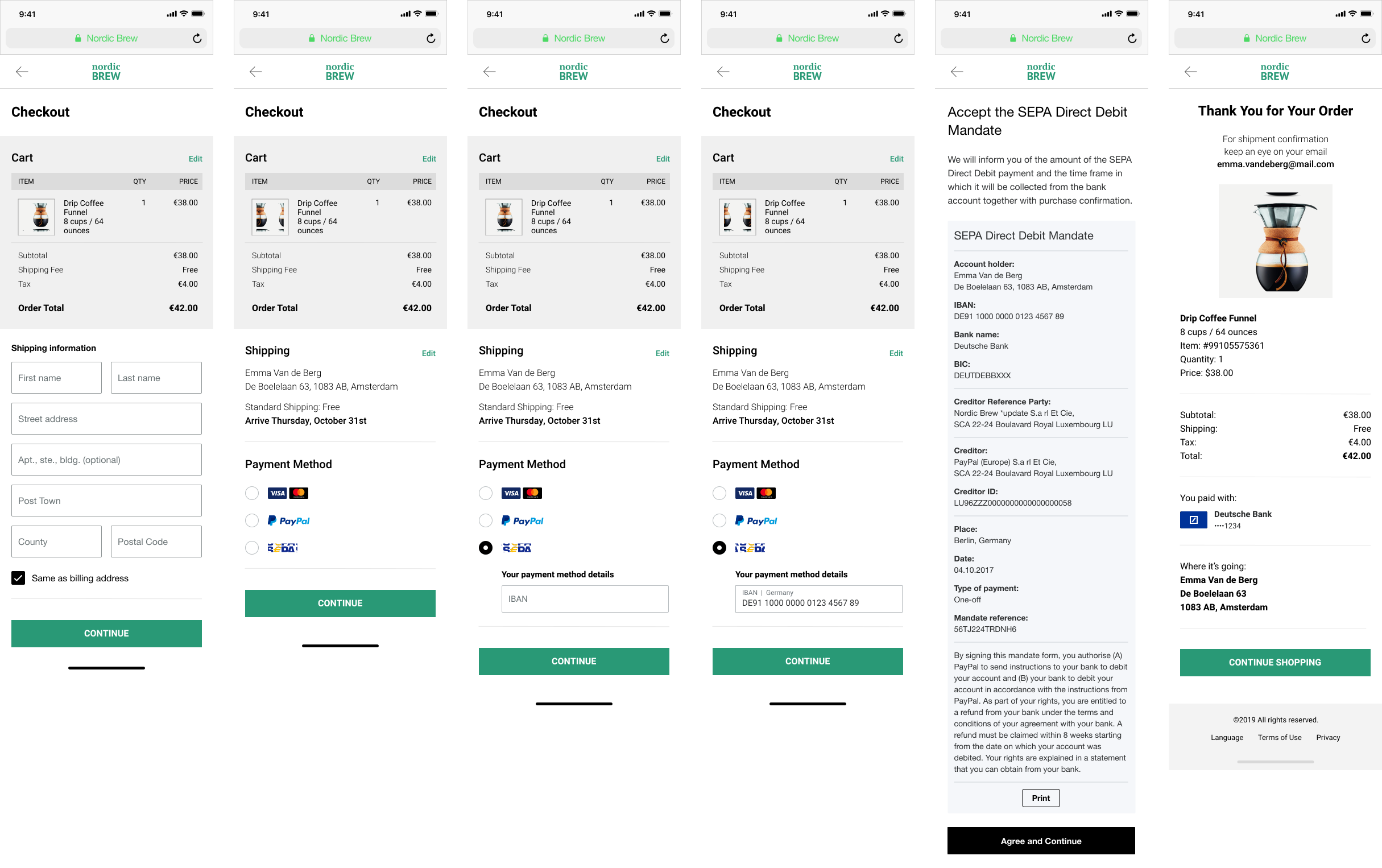
- The customer is presented with the checkout page.
- The customer selects SEPA as the payment method.
- The customer provides their IBAN.
- The customer is redirected to the PayPal-hosted experience to accept the mandate.
- The customer accepts the mandate.
- The customer returns to complete checkout.
Know before you code
Mandate management
The mandate acceptance flow displays mandates, obtains customer authorization, and stores it.
- Mandates conform to SEPA guidelines and are hosted by PayPal.
- Mandates can be specified for one-time or recurrent payments.
- Customer acceptance of mandates is stored at PayPal. Currently, it is not possible to view or update mandates once confirmed.
- Mandates with no transaction activity in the past 36 months or those that fail risk checks are automatically canceled.
Settlement
Transactions usually take 2-3 business days to settle, but with instant settlement, funds should be available immediately after a transaction is completed. The timeframe and details of the settlement process vary between instant and delayed settlement. Currently, only instant settlement is available, but delayed settlement will be available in future product releases.
Disputes and returns
Customers can dispute any transaction with their bank. Disputes raised within eight weeks of the transaction are automatically honored in alignment with SEPA guidelines. Customers can dispute a transaction as unauthorized after eight weeks, but only up to 13 months.
Eligibility
PayPal Direct Banking Platform's SEPA Direct Debit solution is supported for bank accounts in the following countries
| Austria | Belgium | Cyprus | Estonia |
| France | Germany | Greece | Italy |
| Latvia | Luxembourg | Malta | Netherlands |
| Portugal | Slovakia | Slovenia | Spain |
EUR is the only supported currency.
Onboarding
Merchants can enable SEPA as a payment method in their PayPal Payment Settings. Merchants who have previously onboarded for PPCP Advanced will experience a simplified one-click onboarding process. For other merchants, onboarding will require answering of short questions about their business information.
Onboarding sellers
You'll need to onboard your sellers to use this product.
- Modify your Partner Referral API call to include "SEPA" in the products array for merchant onboarding.
- You can also select the "PayPal Complete Payments Full Stack Offering Including SEPA" using the PPCP Onboarding API.
- See Onboard sellers before payment for more information.
1curl -v -X POST https://api-m.sandbox.paypal.com/v2/customer/partner-referrals \2 -H 'Content-Type: application/json' \3 -H 'Authorization: Bearer ACCESS-TOKEN' \4 -H 'PayPal-Partner-Attribution-ID: BN-CODE' \5 -d '{6 "operations": [7 {8 "operation": "API_INTEGRATION",9 "api_integration_preference": {10 "rest_api_integration": {11 "integration_method": "PAYPAL",12 "integration_type": "THIRD_PARTY",13 "third_party_details": {14 "features": [15 "PAYMENT",16 "REFUND"17 ]18 }19 }20 }21 }22 ],23 "products": [24 "PPCP",25 "SEPA"26 ],27 "legal_consents": [28 {29 "type": "SHARE_DATA_CONSENT",30 "granted": true31 }32 ]33 }'
Set up your sandbox account
Before accepting SEPA on your website, verify that your sandbox business account supports it.
Merchants can use the PayPal Developer Dashboard to set up their sandbox accounts to accept SEPA. Partner account integration involves creating a sandbox business account through sandbox.paypal.com. If SEPA is disabled for the account, complete the sandbox onboarding steps to enable it.
- Log in to the PayPal Developer Dashboard and go to your sandbox account.
- Go to Apps & Credentials.
- Ensure you are in the PayPal sandbox environment by selecting Sandbox at the top.
- Select or create an app.
- Scroll down and check if SEPA is enabled. If not, select the SEPA checkbox.
If you created a sandbox business account through sandbox.paypal.com and SEPA is disabled, complete the sandbox onboarding steps to enable it.
When your integration is ready to go live, review the Go Live section for additional SEPA onboarding steps.
Integration guidelines
- Fully customize the SEPA direct debit payment experience and cater to business needs using,
- Orders API - SEPA Direct Debit
- An order represents a payment between two or more parties. Use Orders API to:
- Create an order
- Confirm payment source
- Collect the customer's authorization for the SEPA Direct Debit payment method.
- Capture the order
- An order represents a payment between two or more parties. Use Orders API to:
- Payments API Refunds
- Use the Payments API to refund captured payments.
- Webhooks Management API
- A webhook is an event notification.
- Use the Webhooks Management API to configure a webhook listener for your application and subscribe to transaction events.
- Each transaction must have a unique transaction reference (order ID, invoice ID, and so on) as the value of
soft_descriptor. - Use the request parameter
experience_context.localeto set the locale for your customer. - Provide validated customer addresses, as PayPal performs only minimal validation. Invalid addresses may impact transaction settlement.
- Collect the customer's first and last name, separated by a space. Incomplete names will result in an
INVALID_PARAM_SYNTAXerror.
Create an order
To create an order, copy and modify the following code.
Sample request
API endpoint used: Create Order
1curl -v -X POST https://api-m.sandbox.paypal.com/v2/checkout/orders \2 -H 'Content-Type: application/json' \3 -H 'Authorization: Bearer ACCESS-TOKEN' \4 -d '{5 "intent": "CAPTURE",6 "purchase_units": [7 {8 "amount": {9 "currency_code": "EUR",10 "value": "100.00"11 },12 "payee": {13 "email_address": "[email protected]"14 }15 }16 ]17 }'
Modify the code
After copying the code, modify the following:
- Replace
ACCESS-TOKENwith your access token. - Set
intenttoCAPTURE. - [Optiona] Add a
platform_feesarray within thepurchase_unitsto specify fees for the order.
To help prevent unauthorized disputes, use the soft_descriptor in the Orders API so payers can recognize the transaction on their statements.
Step result
A successful request results in the following:
- An HTTP
201 Createdstatus code. - A JSON response body containing the order ID. You'll use this ID to capture the order.
Confirm payment source
Confirm the order by providing the SEPA payment source using IBAN details.
Limited-release API endpoint used: Confirm Payment Source
- Sample request
- Sample response
1curl -v -X POST 'https://api-m.sandbox.paypal.com/v2/checkout/orders/6EN97188M64374140/confirm-payment-source' \2 --header 'Content-Type: application/json' \3 --header 'Authorization: Bearer ACCESS-TOKEN' \4 --data '{5 "payment_source": {6 "bank": {7 "sepa_debit": {8 "iban": "FR7618106000321234566666610",9 "account_holder_name": "John Doe",10 "billing_address": {11 "address_line_1": "23 Rue du Roi de Sicile",12 "admin_area_1": "Paris",13 "admin_area_2": "Paris",14 "postal_code": "75004",15 "country_code": "FR"16 },17 "attributes": {18 "mandate": {19 "type": "ONE_OFF"20 },21 "customer": {22 "merchant_customer_id": "[email protected]"23 }24 },25 "experience_context": {26 "locale": "en-FR",27 "return_url": "https://example.com/returnUrl",28 "cancel_url": "https://example.com/cancelUrl"29 }30 }31 }32 }33 }'
Step result
A successful request results in the following:
- An HTTP
201 Createdstatus code. - A JSON response body containing the order status,
payment_sourceasbank.sepa_debit, andpayer-actionURL in links. - Use the
payer-actionURL to redirect the customer for mandate approval.
Approve one-time mandate
Redirect the customer to the payer-action URL obtained in the Confirm payment source API response to get the mandate approved.

Step result
Upon successful mandate approval, the customer is redirected to the return_url provided in the confirm-payment-source request under experience_context. After successful mandate approval, you can capture the order.
Capture an order
Set up your server to call the Capture Order API:
- Use the Capture Order v2 API endpoint with
intentasCAPTURE. - Platform integrations must include the
PayPal-Partner-Attribution-Idheader for reporting and tracking.
- Sample request
- Sample response
1curl -v -X POST 'https://api-m.sandbox.paypal.com/v2/checkout/orders/6EN97188M64374140/capture' \2 --header 'Content-Type: application/json' \3 --header 'Authorization: Bearer ACCESS-TOKEN' \4 --header 'PayPal-Partner-Attribution-Id: BN-CODE' \5 --data '{}'
Step result
A successful request results in the following:
- An HTTP
201 Createdstatus code.
Regulatory guidelines
SEPA Return Reason Codes - PDF
- SEPA regulations require you to notify your customer upon successful debit for one-time and recurring transactions. This notification should be displayed on purchase confirmation pages and in associated emails. Informing your customers can reduce returns.
- Merchants must allow buyers to dispute a SEPA Direct Debit for up to eight weeks from the transaction date without question, with disputes automatically honored.
- You may opt to communicate mandate information to your customer during or after mandate authorization.
Any failures to the mandate acceptance (including non-acceptance by the buyer, system errors, or timeouts) will take the customer to the cancel_url provided in the confirm-payment-source request under experience_context. At the cancel URL, a new mandate URL must be requested using the confirm-payment-source API.
Go live
Test integration
Test your SEPA integration in the PayPal sandbox and production environment to ensure your app works correctly.
Sandbox
Use your sandbox login information during checkout to complete a payment using SEPA. Then, log into the sandbox site sandbox.paypal.com to see that the money has moved into your account.
- Open your test page with a supported web browser on any supported device.
- Use test IBANs for SEPA-supported countries to test the transaction flows: Generate IBAN
- Tap the SEPA button to open the SEPA payment experience.
- Make a payment using the SEPA payment method.
- If you have an additional confirmation page on your merchant website, continue to confirm the payment.
- Log in to your merchant account and continue to your confirmation page to confirm that the money you used for payment showed up in the account.
SEPA reports
SEPA transactions, fees, and returns data are included in relevant PayPal reports.
- SEPA transactions are shown as Direct Debit in the Payment Source column of STL, TRR, and Activity Download reports.
- For SEPA returns, the Decline Code column indicates the SEPA return code (see the SEPA Return Reason Codes section).
SEPA Return reason codes
SEPA Return reason codes - PDF
SEPA risks
The SEPA Direct Debit scheme doesn't guarantee funds, as your customer or their bank can initiate disputes.
- Disputes raised within eight weeks of the transaction are automatically honored per SEPA guidelines.
- All returns, including those for disputes and insufficient funds, may incur a return fee charged by the customer's bank and passed on to you.
- Some banks may refuse to honor electronic mandates and return MD01.
- With instant settlement, settled funds may be debited from your account if the customer has insufficient funds. This debit typically occurs 1-2 days after the transaction.
- The SEPA Direct Debit scheme allows returns on any transaction, even those you've already refunded. The scheme doesn't link refunds to the original transaction and permits disputes on the original transaction.