
Standard Client-Side Implementation
Add the Card Fields component to your iOS checkout screen to collect card number, expiration date, and CVV input with built-in formatting, validation, brand detection, and tokenization. When you finish this guide, your app shows the 3 card fields, enables your pay button once the form is valid, and returns a nonce you can send to your server to complete a transaction.
If you need more direct control over card tokenization, see Advanced client-side for iOS v7.
Before you begin
Before you add Card Fields, complete the following:
- Set up the Braintree iOS SDK. See Setup for the base SDK installation.
- Generate a tokenization key or client token. See Client Authorization for the available authorization types.
- Decide where Card Fields fits in your checkout screen. Card Fields renders the card number, expiration date, and CVV fields. You provide everything else, including any non-card fields, such as name or billing address, and your pay button.
Add your pay button
Add a pay button to your view controller. Keep it disabled until Card Fields reports a valid form.
- Swift
private var submit: (() -> Void)?

private lazy var payButton: UIButton = {
    let button = UIButton(type: .system)
    button.setTitle("Pay", for: .normal)
    button.isEnabled = false
    button.addTarget(self, action: #selector(payButtonTapped), for: .touchUpInside)
    return button
}()
Verify: Build and run your app. Your pay button appears and is disabled.
Initialize Card Fields and track form validity
Create the Card Fields component with your authorization and a completion closure for the tokenization result. Chain .onValidityChange to enable your pay button and capture the submit closure.
- Swift
let cardFields = CardFields(
    authorization: "YOUR-TOKENIZATION-KEY",
    completion: { [weak self] nonce, error in
        // Handle the tokenization result
    }
)
.onValidityChange { [weak self] valid, submit in
    self?.payButton.isEnabled = valid
    self?.submit = submit
}
Replace YOUR-TOKENIZATION-KEY with the tokenization key or client token you generated in Before you begin.
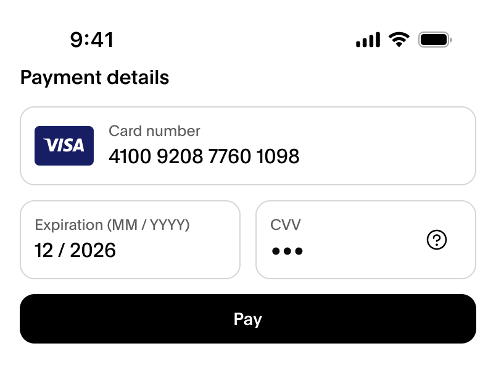
Verify: Enter an incomplete or invalid card number. Your pay button stays disabled. Enter a valid card number, expiration date, and CVV. Your pay button becomes enabled.
Host Card Fields in your view controller
Card Fields is a SwiftUI component. If your app is UIKit-based, embed it in your UIKit view controller with UIHostingController, alongside your pay button.
- Swift
override func viewDidLoad() {
    super.viewDidLoad()

    let hostingController = UIHostingController(rootView: cardFields)
    addChild(hostingController)
    view.addSubview(hostingController.view)
    view.addSubview(payButton)
}
Verify: Build and run. You see the card number, expiration date, and CVV fields alongside your pay button.
Trigger submission from your pay button
Card Fields doesn't include a pay button. Call the submit closure from from your own button's action.
- Swift
@objc private func payButtonTapped() {
    submit?()
}
Verify: Select the pay button with a valid form. The completion closure from the initialization step runs.
Handle the tokenization result
In the completion closure you passed to CardFields, check for a nonce or an error.
- Swift
completion: { nonce, error in
    if let nonce {
        // Send the nonce to your server. See Server-Side to create the transaction.
    } else if let error {
        // Handle the error
    }
}
Verify: Trigger a test submission. Your completion closure receives either a nonce or an error.
Optional: Add supplemental card data
Pass a BTCard object to CardFields to merge non-card data, such as the cardholder name or postal code, into the tokenization request. Card Fields fills in the card number, expiration date, and CVV from the form.
- Swift
let cardFields = CardFields(
    authorization: "YOUR-TOKENIZATION-KEY",
    card: BTCard(cardholderName: "Firstname Lastname", postalCode: "12345"),
    completion: { nonce, error in
        // Handle the tokenization result
    }
)
Verify: Complete a submission. The tokenization request includes the cardholder name and postal code you set, along with the card data from the form.
Test your integration
Test your integration in sandbox before you go live. See Testing and Go Live for sandbox test values and steps to confirm a successful transaction.
Next steps
- See Overview for what Card Fields is and what it replaces.
- See Advanced client-side: iOS v7 for more direct control over card tokenization without Card Fields.
- See Server-side to create the transaction using the payment method nonce.