Accept Swish payments
DocsCurrent
Last updated: Apr 3rd, 9:36am
Key features
- Instant payments: Process real-time bank transfers with immediate settlement to your PayPal business account.
- High conversion rates: Increase sales by offering a leading mobile payment method in Sweden.
- Simplified payment capture: Reduce complexity with automatic authorization and settlement in a single step.
- Flexible payment experience: Deliver seamless payment experiences across all devices with mobile app switching for mobile users and QR code scanning for desktop users.
How it works
- Buyer: Selects Swish at the merchant's checkout page.
- Merchant: Initiates the Swish payment with the order details.
- PayPal: Redirects buyer to Swish for payment approval.
- Buyer: Approves the payment in the Swish app and returns to merchant site.
- Swish: Processes the payment and confirms to PayPal.
- PayPal:
- Captures the payment automatically.
- Sends confirmation to the merchant
- Merchant: Receives payment confirmation and completes the transaction.
- PayPal: Settles money to the merchant's PayPal business account.
- Merchant: Fulfills order and notifies buyer.
Buyer flows
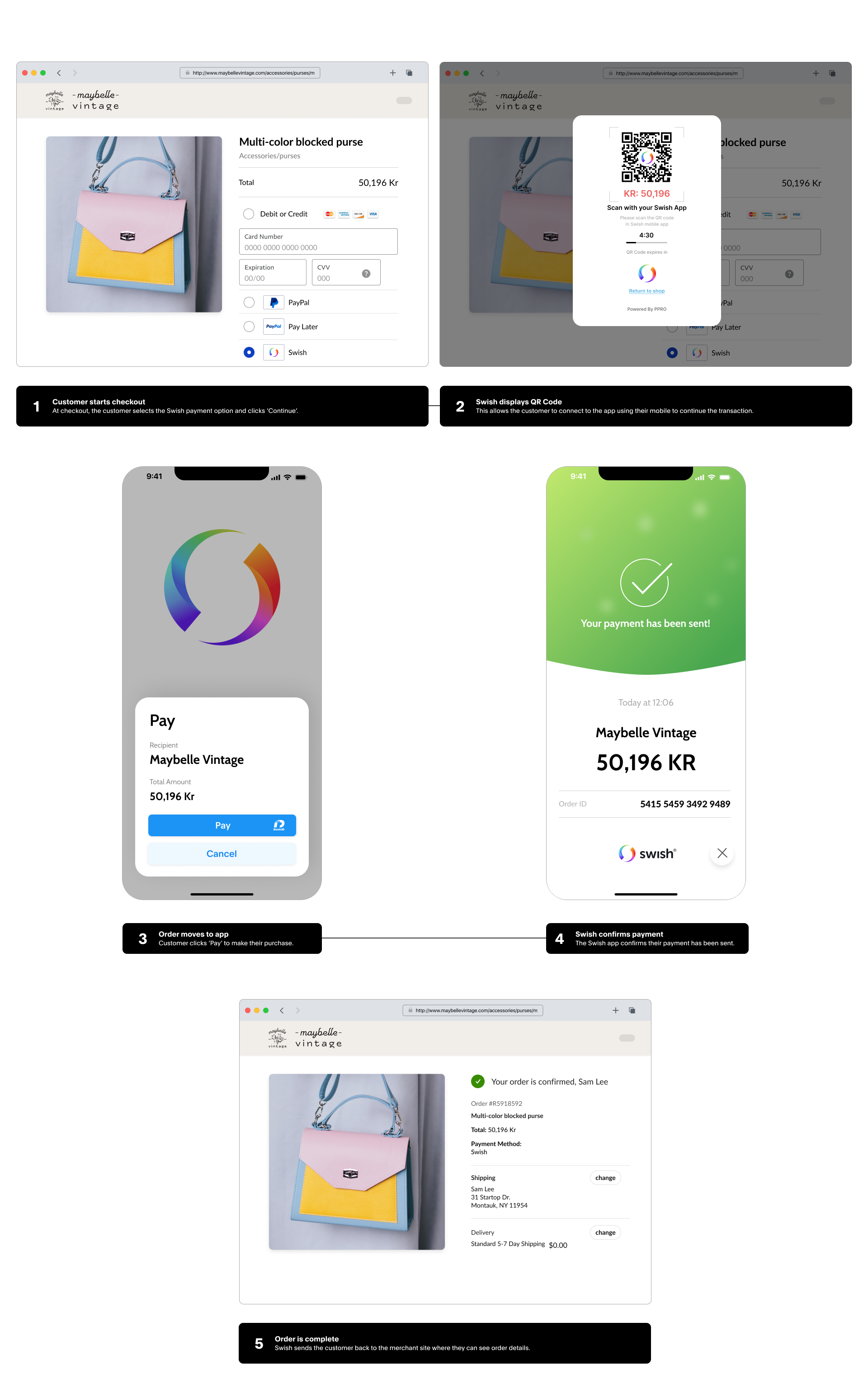
Swish offers two payment flow options to provide seamless experiences across all devices.
- QR code flow: Directs buyers to a payment page where they scan a QR code with the Swish app to authorize payment, then return to the merchant site after approval.
- Mobile app switch flow: Switches buyers directly to the Swish mobile app to authorize payment, then returns them automatically to the merchant site after approval.
Important information
Ensure to review the following information before you add Swish as a payment method.
Integration patterns
Swish supports two integration patterns. Both use the same order creation API, but differ in how you handle the response.
- PayPal-hosted: Redirect buyers to PayPal's payment page using the payer-action link from the order response. PayPal handles the payment UI, simplifying your implementation.
- Merchant-hosted: Display the QR code from
qr_details.qr_imageon your own checkout page. You control the payment UI and maintain your brand experience throughout the flow.
Both patterns support QR code flow and mobile app switch flow. Choose your integration pattern based on your development resources and desired level of control over the buyer experience.
Transaction amount limits
- Minimum amount: 0.01
SEK - Maximum amount: 999999999999.99
SEK